 Overview
As of October 1st, 2021, VirtualShield’s plans now offer support for unlimited devices. Each user on an account, whether it’s an Individual or a Family plan, gets unlimited devices. There’s no more restrictions, device limitations, or caps on your  bandwidth. VirtualShield has gone UNLIMITED.
Now you can add as few or as many additional users as you need. You are  no longer restricted to 5 users. When we say unlimited we truly mean it! Additionally, our new plans allow you to bundle multiple services together, for a lower price. VirtualShield now offers
  much more than just VPN.

In this article
How does it work?
All of our plans have been updated to be user-based rather than device based. This means each user can have unlimited devices*, and additional users can be added to each of our plans.
It doesn’t matter which plan you choose! Our new plans all work the  exact same way. They were designed to be single user accounts by default, and additional users can be added using an add-on.
This includes our  legacy plans. However, the Individual and Family plans have been discontinued. Our new plans are strongly recommended for the highest level of security, at the lowest price.
After enabling2-factor authentication (coming soon!) you get unlimited devices. Otherwise, each user will be limited to 5 devices.
Why is it important?
While we understand that sharing accounts and passwords is very easy, it is not the most secure sharing solution. Please be aware sharing your password can lead to dangerous consequences.
If your credentials end up in the wrong hands, they can lock you out of your account or gain access to your personal data. You could be giving others access to your other accounts without even knowing it.
To combat this problem, we offer affordable plans where every user gets their own unique email and password, along with unlimited devices. This allows your entire family to stay protected, while keeping your credentials secure at the same time.
That’s why using a strong password is so important. Hackers use malicious tools to
crack passwords containing common
letters,
numbers, or phrases.

Adding additional users
If your plan includes multiple users, you can add or remove additional users by visiting your Account Dashboard. Now you can share protection without compromising your security.
How to add additional users to your plan:
Start by visiting your Account Dashboard. Select  My Subscription from the navigation menu, or use the link below:
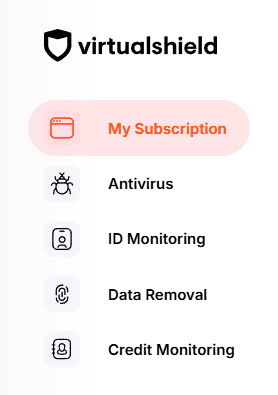
Below Family Members, press the Add member button.
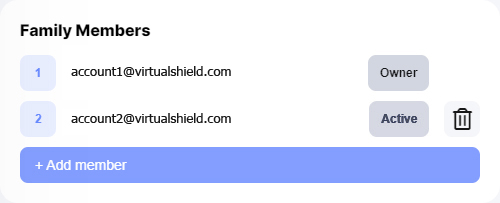
If you don’t see this option, it is likely you have a single user plan. Contact our support team if you would like to add additional users.
Enter your family member’s email address, then press Invite.

An invitation link will be sent to their email. This is an important step to complete the registation. See our support article for more information.
Common Questions
I have a Family plan, what should I do?
Your Family plan still includes up to5 users. You can keep your existing plan or you can upgrade to one of our new plans to maximize your savings. The choice is yours! Contact our support team for more details.
Can I use the Antivirus on unlimited devices?
The
What happens if I downgrade my subscription?
If you downgrade from a multi-user plan to an single user one, any additional users will be removed when you downgrade. Contact our support team to downgrade without losing additional users.